
Airthings
Airthings ASAHouse & Home
4.4475.00 Reviews
- Version
- 8.1.4
- Installs
- 100.00K
- Age Rating
- Everyone
Screenshots
Our Review of Airthings
 Analysis by Appyee
Indoor air is easy to ignore because most problems are invisible. I can feel when a room is too warm or stuffy, but I cannot reliably judge whether ventilation is helping, whether a bedroom is comfortable overnight, or whether a sudden change is worth investigating. Airthings is designed to make that kind of information easier to follow when you use Airthings devices at home. I found it most useful as a companion for building better habits, rather than as a standalone smart-home controller.
That distinction matters. This is a free House & Home app from Airthings ASA, and its purpose is to bring information from the company’s devices into one place. It is suitable for Everyone, runs on devices using at least iOS or Android version 12, and the current version is 8.1.4. The app has reached over one hundred thousand installs and holds a 4.4 average from around six thousand ratings, which gives it a solid reputation without making it seem universally perfect.
How I use Airthings as an indoor-air baseline
My preferred way to use the app is to start with a quiet baseline instead of reacting to every individual reading. After setting up a compatible Airthings device, I check the app at ordinary times: when the room has been closed for a while, after cooking, after opening a window, and in the morning after sleeping. The point is not to chase a “perfect” number every few minutes. It is to learn how a particular room behaves.
This approach makes the app more practical than a quick glance at a sensor. A single reading tells me what is happening now; repeated checks show patterns. For example, a bedroom may seem fine before bedtime but change after the door is closed overnight. A home office may look normal early in the day and become less comfortable after several hours of work. Airthings gives me a place to compare those moments and decide whether a simple habit, such as airing the room at a particular time, makes a noticeable difference.
The first useful workflow is deliberately simple. I choose one room, keep the device in a consistent position, and observe it for several normal days before changing too many things. Moving the sensor repeatedly or opening windows every time I look at the app makes it harder to understand cause and effect. Experienced use begins with consistency: same room, similar daily routine, and notes about unusual events such as cooking, cleaning, guests, or a long period with the heating on.
That method also prevents overreacting. Indoor conditions naturally change, and an app cannot replace common sense or professional advice when there is a serious health, safety, or building problem. I treat the readings as useful evidence for everyday decisions, not as a diagnosis. If a room repeatedly feels wrong, the app can help me identify when the change happens, but it does not magically explain every possible cause.
The everyday scenario where it earns its place
Consider a small home office. I start work with the door closed because I want fewer distractions. After a few hours, the room feels stale, but I am not sure whether the problem is temperature, ventilation, or simply concentration. Instead of guessing, I check Airthings before taking a break, then check again after opening the door or window. Repeating that routine over several workdays gives me a much better basis for deciding when to ventilate.
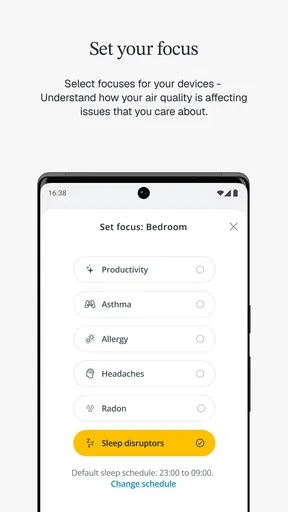
The same habit works in a bedroom. I can check the room before sleep and again in the morning, then compare those observations with whether the door was open, whether the weather changed, or whether the room was occupied by more people than usual. The app is especially helpful when the cause is not obvious because it turns a vague feeling into a timeline that I can discuss or act on.
For families, the value is less about watching the screen constantly and more about agreeing on a routine. One person can check the app during the morning, another can look after cooking, and everyone can learn which simple actions actually improve the room. That makes the device-and-app combination more useful than a sensor that is installed and then forgotten.
Settings I would check before relying on it
I would not begin by changing every available option. I first make sure the correct device and room are easy to identify, especially if more than one Airthings device is being used. Clear naming is a small detail, but it prevents the classic mistake of opening the app, seeing a reading, and assuming it belongs to the room I am standing in.
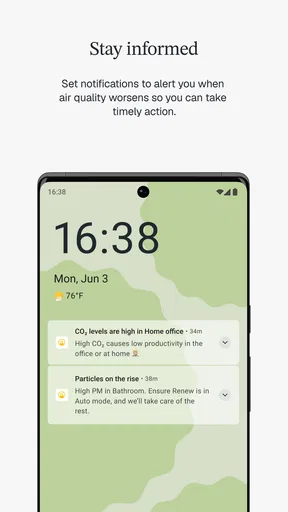
I also check how the app presents notifications and background activity on my phone. The best balance depends on how actively I want to monitor the home. Someone who only wants occasional review may prefer fewer interruptions, while a user tracking a recurring room problem may want timely prompts where the app supports them. I avoid enabling every alert automatically because too many reminders quickly become noise.
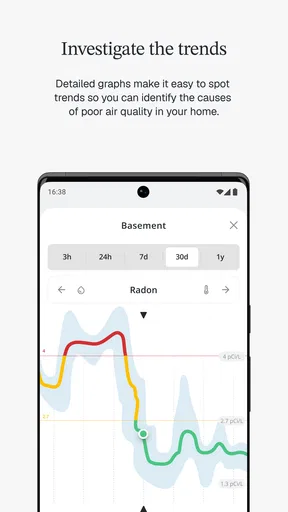
Another worthwhile check is the display of historical information. I use longer views when I am looking for a repeated pattern and shorter views when I am testing an immediate change, such as ventilation. Mixing those purposes can lead to poor conclusions: a short improvement does not necessarily mean the room stays improved, while a long-term trend can hide the effect of a quick action.
Phone permissions and operating-system behavior can also affect the experience. Airthings requires a reasonably modern mobile platform, with version 12 as the minimum, so anyone using an older phone should check compatibility before planning around it. On a supported device, I still review battery-saving restrictions if updates or notifications seem delayed. That is not a special Airthings problem so much as a reminder that connected-device apps depend on the phone’s own rules.
I would also decide who needs access before building a routine. If several people manage the home, consistent naming and a shared agreement about what to check are more valuable than everyone making separate guesses. The app works best when its information leads to the same practical response, rather than becoming another dashboard that nobody interprets in the same way.
Faster patterns for people who check every day
Once the baseline is clear, I stop treating the app as something that needs a full inspection each time. My faster pattern is to check the main room view, look for a meaningful change, and only then open the longer history. This keeps a daily check brief while preserving the ability to investigate unusual behavior.
A useful habit is to pair each check with an action and a later recheck. If I ventilate a room, I return to the app after a reasonable interval instead of assuming the action worked. If I close a window because the room became uncomfortable, I check again later to see whether the condition returns. This turns Airthings into a feedback loop: observe, change one thing, and observe again.
The most reliable shortcut is not a hidden button; it is a repeatable routine. I use the same checking points each day and change only one environmental factor at a time whenever possible. That makes the history easier to understand and prevents me from crediting the wrong action. For example, opening a window while also turning on heating tells me much less than testing ventilation on its own.
Users with multiple rooms can save time by assigning each room a question. The bedroom question might be, “What changes overnight?” The office question might be, “When does the room become uncomfortable during work?” A living-room question might focus on what happens after cooking or when several people are present. This prevents endless browsing and makes each visit to the app purposeful.
I also recommend reviewing patterns at a fixed weekly moment rather than relying only on memory. A short review can reveal that a problem happens on particular days, after a certain household activity, or only when a room remains closed. The app becomes much more valuable when it helps identify repeatable triggers instead of merely confirming that conditions are different from yesterday.
Where the app is stronger than usual alternatives
The usual alternative is a basic standalone display or an occasional manual check of a room. Those options can be convenient, but they encourage short-term attention. Airthings is more useful when I want a connected history across Airthings devices and a phone-based view that I can revisit. Its strength is not that it eliminates the need to think; it gives me more context for thinking clearly.
Compared with a general smart-home dashboard, the focused approach is also appealing. A broad home-control app may combine lights, thermostats, cameras, and other equipment, but indoor-air information can become just another tile. Airthings keeps the experience centered on its own devices and their readings. For someone already invested in Airthings hardware, that focus feels more coherent than forcing everything into a general-purpose interface.
There is a trade-off, though. A standalone display can be faster for someone who wants to glance at a number without opening a phone. A general smart-home platform may be preferable for a person whose main goal is automation across many brands. Airthings makes the most sense when the priority is understanding information from Airthings devices, not replacing every other part of a connected home.
I would also distinguish it from simply opening windows whenever a room feels stale. That instinct is sometimes sensible, but it is inconsistent and can waste energy or create discomfort. Using the app helps me test whether a ventilation habit is actually useful in a particular room. It does not make the decision automatically, but it gives the decision a better foundation.
Advanced use without pretending the app does everything
The advanced value comes from combining history, room context, and disciplined experiments. I might compare a normal weekday with a weekend, or a night with the bedroom door open against one with it closed. I record the household change mentally or in a simple note, then use the app to see whether the pattern repeats. Repetition matters more than one dramatic result.
Another useful trade-off is sensor placement. A device placed where it is constantly affected by a window, vent, radiator, kitchen activity, or direct sunlight may reflect that local spot rather than the room as a whole. I avoid moving it every day, but I do think carefully about whether its position represents the question I am asking. If I care about sleeping conditions, a location near the sleeping area is more relevant than a hallway, provided it is placed safely and consistently.
When a reading changes unexpectedly, I investigate the household event before assuming the device or app is at fault. Cooking, showers, cleaning products, visitors, weather, heating, and a closed door can all change the context. The app is most helpful when I use its timeline to connect a change with something that happened at home.
There are limits to this method. Airthings can organize information from its devices, but it cannot inspect insulation, diagnose ventilation equipment, or determine the cause of a building defect by itself. It is also not the right tool for someone who has no compatible Airthings hardware and only wants a general air-quality app. In that situation, a service based on local outdoor conditions or a different sensor ecosystem may be a better fit.
I would skip it as well if I dislike connected-device routines altogether. The app rewards users who check patterns and adjust habits. Someone expecting a one-time installation followed by completely automatic answers may find the experience less satisfying. The hardware and phone are partners here; neither is especially useful if the other is ignored.
What I would want new users to know
The free price makes trying the app less of a commitment, but the practical value depends on owning or choosing an Airthings device. It is not a universal replacement for every indoor monitor, and the app should not be judged as though it were meant to control unrelated home equipment. Its job is narrower and clearer: help users work with their Airthings devices in a phone-based environment.
The Everyone age rating makes it approachable for a household, although younger users still need sensible guidance about what readings mean and what actions are appropriate. I would not encourage anyone to make major health or safety decisions from a single screen. The strongest use is shared observation followed by ordinary, sensible household actions.
Version 8.1.4 feels relevant for anyone comparing installation instructions or troubleshooting an older phone, but I would still keep the app updated through the normal store process. Connected apps can change how they present information over time, and using the current release reduces avoidable compatibility friction.
Finally, I would not confuse popularity with suitability. Around one hundred thousand installs and a 4.4 average indicate that many users find the app worthwhile, but the right question is whether its workflow matches your home. If you already use Airthings hardware and want a clearer way to review room behavior, the answer is likely yes. If you want broad automation, a cheap instant display, or information without buying into a device ecosystem, another option may suit you better.
My verdict after building a routine around it
Airthings is best when it turns indoor-air monitoring into a calm, repeatable habit. I like it because it encourages me to look for patterns instead of reacting to isolated readings. The combination of room context, history, and simple before-and-after checks gives the app genuine everyday value, especially in bedrooms, offices, and rooms that often feel uncomfortable for reasons that are difficult to identify.
Its weaknesses are equally clear. The experience depends on compatible Airthings hardware, it does not diagnose building or health problems, and it may feel too specialized for someone seeking a complete smart-home hub. The app also asks for a little patience: useful conclusions come from repeated observations, not from opening it once and expecting an instant answer.
For me, that is a fair trade. I would recommend the free Airthings app to anyone already using the developer’s devices and willing to create a consistent checking routine. Start with one room, name it clearly, review normal patterns, change one thing at a time, and use the history to confirm whether a habit really helps. Used that way, Airthings is not just another dashboard; it is a practical record of how your home responds to everyday life.
If your priority is a broad automation system or a simple screen that requires no interpretation, I would look elsewhere. But if you want to understand your indoor environment and make better ventilation and room-use decisions with Airthings devices, Airthings is a focused, approachable companion that earns its place through steady use rather than flashy promises.
Verdict
Strengths of Airthings
- Provides continuous indoor air-quality monitoring and clear health insights.
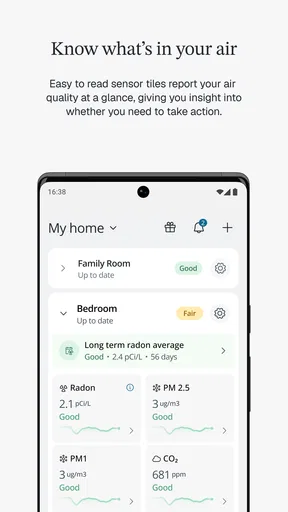
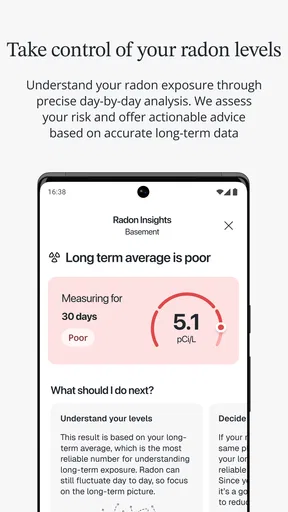
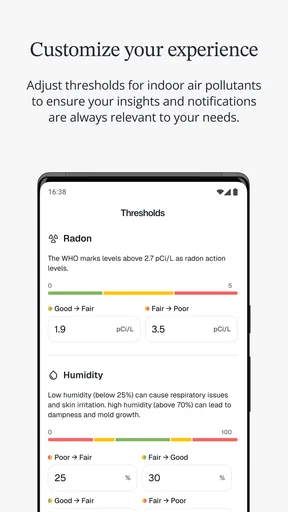
- Tracks radon, CO₂, humidity, temperature, and airborne particles, depending on device.
- Customizable notifications can warn you when readings reach unhealthy levels.
- Historical charts help identify patterns and improve ventilation habits.
- Supports multiple Airthings monitors from one convenient mobile dashboard.
Limitations of Airthings
- Most advanced features require purchasing separate Airthings monitoring hardware.
- Some devices need a subscription for expanded insights and monitoring features.
- Readings may take time to stabilize after moving a sensor to a new location.
- Bluetooth setup and device connectivity can occasionally be unreliable.
- The app may feel excessive for users who only need basic temperature readings.
Similar Picks in This Category
View All
Universal TV Remote Control
CodeMatics Media Solutions3.9

AlfredCamera Home Security app
Alfred Systems Inc.4.7

Planner 5D: AI Home Design
Planner 5D4.5

Universal Tv Remote-Cast to TV
One Music Player4.1

Zillow: Homes for Sale & Rent
Zillow Group4.8

99acres Buy/Rent/Sell Property
infoedge.com4.3
Frequently Asked Questions
What is Airthings, and what can I use it for?
Airthings is a collection of smart indoor air-quality monitors and a companion mobile app for Android and iOS. After pairing a compatible monitor, the app displays readings such as radon, carbon dioxide, particulate matter, humidity, temperature, and airborne chemicals, depending on the device. It also provides historical graphs, notifications, and practical guidance to help you understand and improve indoor air conditions.
Which Airthings measurements are available in the app?
The measurements depend on the Airthings monitor you own. Some models focus on radon, while others track carbon dioxide, fine particles, volatile organic compounds, humidity, temperature, pressure, and noise. The app clearly separates the available sensors and presents current values, trends, and health-related indicators. Before downloading, check your specific model because not every device supports every measurement.
Does Airthings require a subscription or additional equipment?
You need a compatible Airthings monitor to collect live readings; the app alone cannot measure indoor air quality using only your phone. The basic app experience is generally designed to display data from your purchased device, although features and services can vary by product or account type. Some monitors connect directly by Bluetooth, while others offer Wi-Fi access and remote monitoring.
How does Airthings connect to my phone and home network?
Initial setup normally involves creating or signing in to an Airthings account, enabling Bluetooth, and following the in-app pairing instructions. Depending on the monitor, you may also connect it to Wi-Fi so readings can synchronize while you are away from home. Bluetooth-only models may require your phone to be nearby, whereas Wi-Fi-enabled devices can provide broader access and alerts.
Is Airthings accurate enough for health and home decisions?
Airthings can be a useful tool for spotting trends and identifying changes in indoor conditions, but it should not replace professional testing, medical advice, or certified safety equipment. Sensor accuracy can be affected by placement, ventilation, temperature, humidity, and calibration conditions. For serious concerns such as elevated radon or dangerous pollution, use the app as an indicator and consult qualified professionals for confirmation and action.
